

I set reminders on my phone very often for a variety of tasks – checking the laundry, cook timers, banking things, work tasks, etc. It’s a pretty critical part of my daily life. Most “big” or recurring tasks I put in my calendar or don’t otherwise have trouble with, but smaller tasks that come up day-to-day are hard for me to remember without something like this. So reminders failing to actually remind me is pretty impactful to me, and so it was very inconvenient when Google’s reminder system just stopped sending reminders for several days in a row. This happened to me happened multiple times.
I never conclusively determined the cause of this as it did not seem to affect everyone, but there was enough online chatter about it when I checked to convince me that it wasn’t something I had done. It seemed to be related to a bad Google Play Services update1. Google generally does phased rollouts so this was likely something rolled out to x% of devices and then corrected before rolling out to all devices. However Google never acknowledged this issue publicly anywhere I could find. This was during Google’s Google Now phase, where Now was the voice assistant, reminder system, and a few other things. So if you used the voice assistant to set a reminder, your reminder went into the bowels of Google Now where you were hopefully notified as expected. There was no trivial way to see a list of reminders, so when they quit alerting me I didn’t even know what I was missing.
When this failed for me the second time I started looking into alternatives which worked for me, the biggest priority being able to set the reminders as easily as possible, preferably via a voice assistant. If I was starting fresh today I might have gone down a different path, but currently I have a solution I like using a combination of software I was mostly already using for other things: Nextcloud, Home Assistant (including its voice assistant), Tasks.org mobile app, and a small Python script running in a local Windmill instance.
The workflow for setting reminders usually goes:
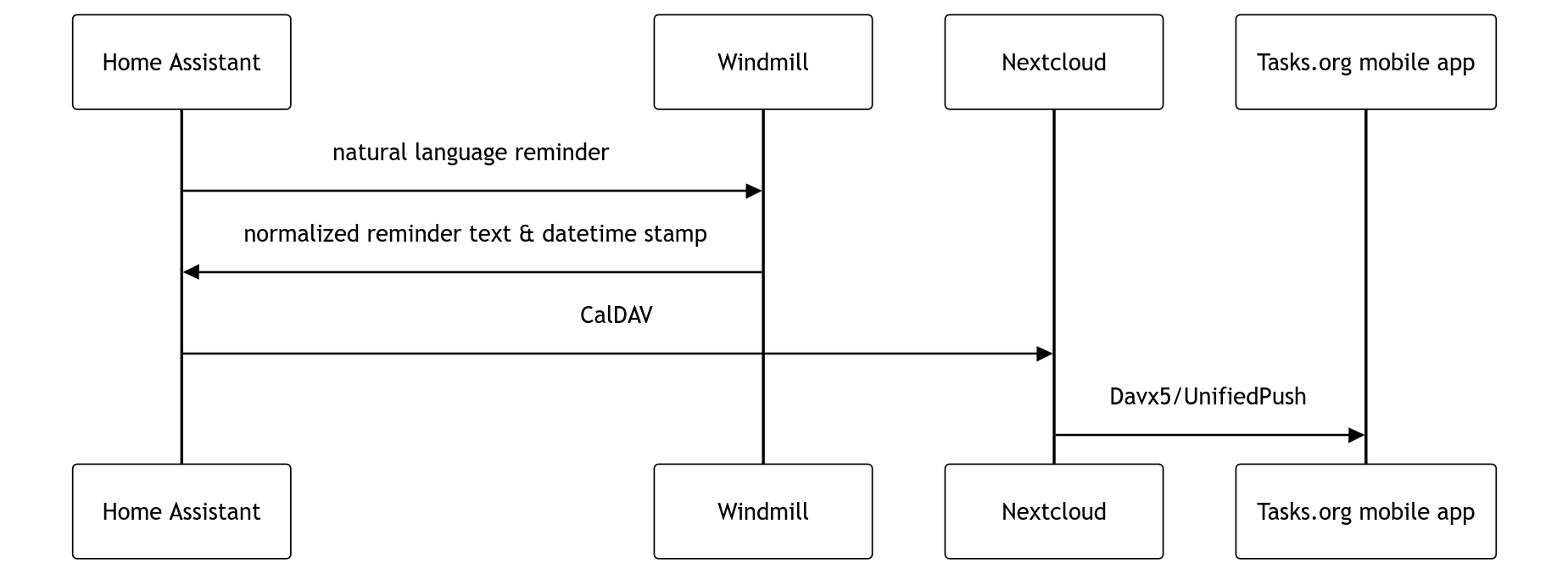
I currently use some Home Assistant Voice Preview devices around my apartment to access the voice assistant as well as use it as the default assistant app on my phone. The voice assistant allows setting custom sentences which can trigger custom automations. In my case for any sentence starting with “remind me”, the text of that sentence is passed via webhook to reminders.py.
The script separates the reminder from the time and date it should be set for, and then converts the natural language to a standard ISO 8601 format. Both the reminder text and the datetime string are returned to Home Assistant.
reminder.py
from datetime import timezone, datetime, timedelta
import os, time
import parsedatetime
import pytz
from pytz import timezone
import json
import re
from typing_extensions import evaluate_forward_ref
import wmill

day_declared_words = ["tomorrow", "monday", "tuesday", "wednesday", "thursday", "friday", "saturday", "sunday"]
relative_time_words = ["in", "on", "at"]

def split_day_declared(reminder):
    match = next(((w, reminder.find(w)) for w in day_declared_words if w in reminder), None)
    if match:
        word, pos = match
    return [reminder[:pos-1], reminder[pos:]]

def split_relative_time(reminder):
    # Iterate through words and check for a regex match immediately
    # rather than a simple substring match
    # This correction suppled by Google Gemini
    found_word = None
    last_index = -1

    for w in relative_time_words:
        pattern = rf"\b{re.escape(w)}\b"
        matches = list(re.finditer(pattern, reminder))
        if matches:
            found_word = w
            # Take the last occurrence of the word (e.g. "meeting at home at 5pm")
            last_index = matches[-1].start()
            # Stop after finding the first valid relative word match
            break

    if last_index != -1:
        return [reminder[:last_index].strip(), reminder[last_index:].strip()]

    # Fallback if no split word is found (prevents crash, assumes all is reminder)
    return [reminder, ""]

def normalize_time(s):
    # "a.m." / "a.m" / "p.m." / "p.m" → "am" / "pm"
    s = re.sub(r'\ba\.m\.?', 'am', s, flags=re.IGNORECASE)
    s = re.sub(r'\bp\.m\.?', 'pm', s, flags=re.IGNORECASE)
    # "3.30pm" / "3.30 pm" → "3:30 pm"
    s = re.sub(r'\b(\d{1,2})\.(\d{2})\s*(am|pm)\b', r'\1:\2 \3', s, flags=re.IGNORECASE)
    # "3 30 pm" / "3 30 p.m." → "3:30 pm"
    s = re.sub(r'\b(\d{1,2})\s+(\d{2})\s*(am|pm)\b', r'\1:\2 \3', s, flags=re.IGNORECASE)
    # "330pm" / "330 pm" / "1130pm" → "3:30 pm" / "11:30 pm"
    s = re.sub(r'(?<!\d)(\d{1,2})(\d{2})\s*(am|pm)\b', r'\1:\2 \3', s, flags=re.IGNORECASE)
    return s

def convert(reminder, tz="US/Eastern"):
    tz = tz or "US/Eastern"
    os.environ['TZ'] = tz
    time.tzset()
    reminder = normalize_time(reminder)
    cal = parsedatetime.Calendar()
    tz_info = timezone(tz)
    now = datetime.now(tz=tz_info)
    datetime_obj, _ = cal.parseDT(datetimeString=reminder, tzinfo=tz_info, sourceTime=now)
    if datetime_obj < now:
        datetime_obj += timedelta(days=1)
    print(datetime_obj)
    return datetime_obj.isoformat()


def main(reminder: str, timezone: str = "US/Eastern"):
    reminder = reminder.lower()
    if any(w in reminder for w in day_declared_words):
        [reminder, due_date] = split_day_declared(reminder)
    else:
        [reminder, due_date] = split_relative_time(reminder)
    due_date = convert(due_date, tz=timezone)
    response = {
        "datetime": due_date,
        "reminder": reminder
    }
    return response
Home Assistant then sets a Todo using the builtin Home Assistant functionality, with a due date of that ISO 8601 string. The todo list is configured to use a CalDAV account on my Nextcloud server which is where my calendars and contacts are stored. Once there it is synced to my phone’s Tasks.org app via DAVx⁵. I use my own ntfy instance along with UnifiedPush to sync the reminders to my phone near instantly so I don’t have to wait for the scheduled sync every 15 minutes. This is neeeded for any reminders I’m setting less than 15 minutes away which is great for cooking. It has the added advantage that if I mark a reminder as complete on Nextcloud or Home Assistant, the notification on my phone vanishes near instantly.
So the end result is now I can say (or type) to my assistant something like “remind me to put the laundry in the drier in 45 minutes” and less that 30 seconds later that reminder is in the Tasks.org app on my phone, and will fire at the appropriate time.
This is the main way I set reminders but this has the additional benefit of making my reminders available to view and edit across the Home Assistant Todo integration, Nextcloud, and Thunderbird. And if any of the components go down the other ones will have an offline copy of the reminders. This has been working well enough that I set up an almost identical configuration to set alarms on my phone.
This setup is pretty close to perfect for my usecases and makes me feel much more reassured that I won’t lose a reminder. It’s also flexible enough that I can change voice assistants, CalDAV servers, etc. without affecting this much. I began working on this initially just because of the failed notifications, but more recently I’ve been trying to deGoogle as much as I can in my life and this was nice to already have done and working. Next up will be trying to move to GrapheneOS and move off Gmail!
Photo Credit: https://www.piqsels.com/en/public-domain-photo-olrqv
-
Essentially all Android devices which have the Play Store also have Google Play Services. This provides a lot of the functionality of modern Android and can be updated independently of the Android OS. And it is in fact updated on every Android phone approximately every six weeks, invisibly to the user unless you check the version number in your app settings. This means Google can silently deploy, update, or in this case break Android features at will. ↩︎